

 Instagram
 Facebook
 LinkedIn
 X
 YouTube Soon
 TikTok Soon
 Threads Soon
 Pinterest Soon
 Bluesky Soon
 Claude
 ChatGPT
 Claude Code
 Cursor
 Codex
 OpenAI dots
 Meta Muse
 OpenClaw
 Grok Bot
 Hermes Agent
 Kimi
 DeepSeek
 GLM (Z.ai)
 Gemini CLI
 Any agent with MCP
AI Social Media Manager: Use Your Own AI Agent

By The PostReach team. Published . Updated . More posts
Drafted with AI help. The PostReach team checked the facts on 5 November 2026.

In this post
If you already pay for Claude or ChatGPT, you may not need to buy an AI social media manager. Your own AI agent can draft posts and, through a remote MCP server, hand them to a tool that schedules and publishes them. As an example, 5 accounts cost US$32 a month with Claude Pro at US$20 and PostReach at US$12, checked 5 November 2026. What an agent shouldn’t do is publish alone. It can state something false with total confidence, and it can’t answer for what goes out under your name. So a named person should approve each exact post.
PostReach, our product, is that publishing and approval layer. It isn’t an AI social media manager: it writes nothing and runs no AI. Other tools below can fill the same role, and for some readers a tool with AI built in is the better buy.
What an AI social media manager is, and the two kinds
The phrase covers two different purchases. Vendors’ pages below were read on 5 November 2026.
A tool with AI built in. You open the scheduler, and its AI drafts inside it. Buffer’s AI Assistant is on every plan, Later includes AI credits by plan, Hootsuite says “Every plan runs on Wisdom”, Sprout Social includes its agent Trellis, and Postiz adds a copilot and AI images and video.
Your own agent plus a publishing tool. You stay in the AI agent you already use, with your files and instructions in reach. A publishing tool connects to it and handles what a model can’t: holding the logins, keeping the calendar, publishing on time, and trying again when a network fails. Servers for this come from Buffer, Postiz, Metricool, Publer on Business and up, Social Champ, Hootsuite and PostReach. We’ve written about the wider shift in why social media work is moving from dashboards to conversation.
What an agent can do today, and what it can’t
What it does well
- Draft from your notes, a product page or last month’s posts, then rewrite for each network.
- Turn one idea into a week of variations.
- Take plain instructions, like Buffer’s example: “Schedule this for tomorrow at 9am on LinkedIn and Threads.”
- Read your queue, spot the gaps and move a post when plans change.
- Summarize your figures, where the server passes them on.
Expect to edit. A draft is only as good as the notes and examples you give it.
What it can’t do on its own (quotes read 5 November 2026)
- Reach a network. A model has no login to your accounts. Without a connected tool, it can only hand you text to paste.
- Know what’s true about your business. It fills gaps with something plausible. For example, ask for a post about your sale without giving the end date, and it may supply one.
- Know what happened this morning. A cheerful post drafted last week doesn’t know about today’s bad news, in your town or your industry.
- Resist every hidden instruction. Anthropic warns that “Malicious MCP servers may include hidden instructions that try to make Claude perform unintended actions”. It says Claude’s protections “attempt to block these attacks”. Attempt is the honest word. Its Claude Code docs add: “Servers that fetch external content can expose you to prompt injection risk.”
- Answer for what goes out. X puts it plainly: “You are ultimately responsible for the actions taken with your account, or by applications associated with your account.”
How it works with MCP, in plain words
MCP “is an open-source standard for connecting AI applications to external systems”. Its site compares it to a USB-C port. In practice:
- You add a server’s address to your AI agent once, and sign in.
- The server tells the agent what it can do, such as create a draft or list scheduled posts.
- You ask for something. The agent writes the post and calls the tool.
- The tool deals with the network.
Here’s the part that matters. MCP doesn’t force anyone to check. Its specification says tools are “designed to be model-controlled”, and “the protocol itself does not mandate any specific user interaction model”. It does say “there SHOULD always be a human in the loop with the ability to deny tool invocations”, but SHOULD isn’t MUST, and the specification’s main page says “MCP itself cannot enforce these security principles at the protocol level” (version 2026-07-28, read 5 November 2026).
So whether you get asked depends on your agent and your server. OpenAI says that for write actions “ChatGPT may ask for confirmation based on app permissions and the action’s context”. Cursor “asks for approval before using MCP tools by default”, though its Run Modes can let allowlisted tools run at once. Anthropic tells you to “only click “Allow always” when using a server and tool that you trust to run unsupervised”. One click on Allow always, and a publish tool may stop asking. A real check has to be built in on purpose.
Why a person should approve each exact post
A post can’t be fully taken back. You can delete it, but people have already read it.
The account is yours, and so are the rules. Beyond X’s line above, X’s automation rules add: “Ask for the user’s permission before taking an action if you aren’t sure.” LinkedIn’s API Terms, at 3.1(26), bar using the APIs “to automate posting on the LinkedIn Services”. Its User Agreement, in the Don’ts at 8.2, bars “bots or other unauthorized automated methods” to “create, comment on, like, share, or re-share posts”. Neither draws an exact line, and this isn’t legal advice. A person choosing each post is the cautious way to read them.
Agents are confident when they’re wrong. A wrong price, an expired offer or a made-up figure reads just as smoothly as a true one. Someone who knows the business catches these quickly. A model can’t, if the truth isn’t in what it’s been given.
The exact post matters more than the idea. Saying yes to “a post about the launch” isn’t the same as approving these words, on this account, at this time. Words can drift between your yes and the send. PostReach ties approval to the exact post. Changing a word asks again. Moving a time doesn’t, and it’s recorded. There’s no unattended mode, so if you want posts going out with nobody looking, it isn’t for you.
LinkedIn built its own server this way. Its My Profile MCP server, which edits profiles rather than posts, says: “The model cannot publish changes independently.” Its docs, last updated 4 November 2026, add: “Every write follows a read → preview → approve → apply flow.”
Not all approvals are equal. On PostReach you can approve on a card in the chat, in the browser, or by saying yes in the chat. A yes typed in the chat is relayed by the model, so it’s only as dependable as the model. For a post that really matters, use the browser. The record shows which route was used, along with the person, the exact post, the account and the time.
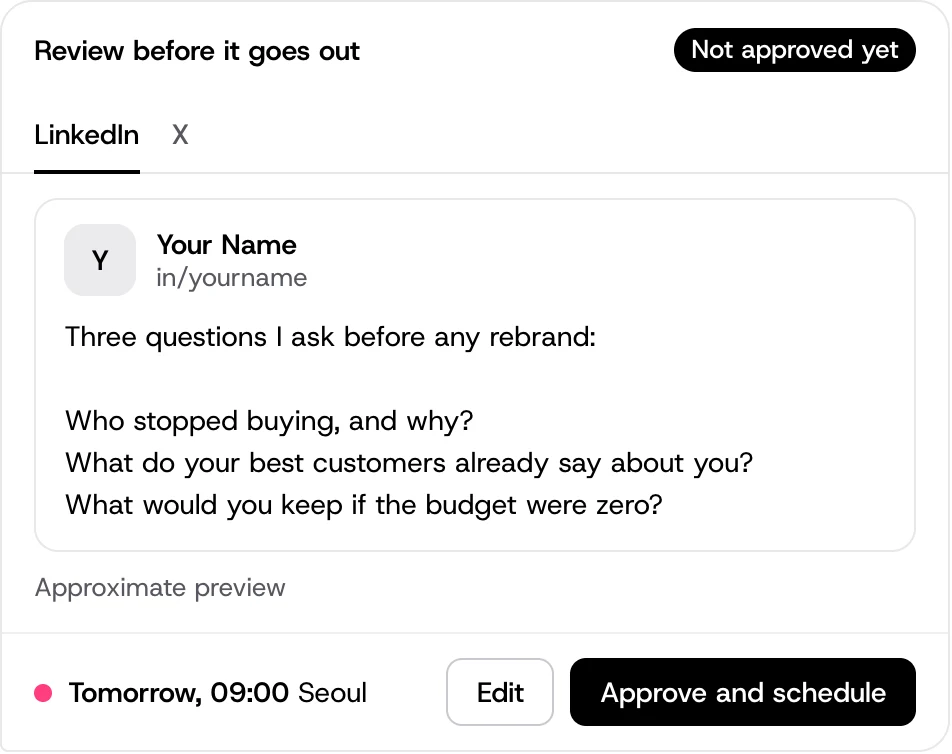
Other tools handle this differently. Buffer says posts “land in your Buffer queue as drafts or scheduled posts”, and on its Team plan, posts from someone set to Needs Approval “will always be saved as drafts awaiting approval”. Markifact’s Instagram server promises “approval before every write”. We compare those servers in LinkedIn and Instagram MCP servers, side by side.
Setting it up in Claude, ChatGPT, Cursor and Claude Code
The steps are the same everywhere: add the server’s URL, sign in, connect your social accounts at the publishing tool, then ask for one low-stakes post and watch how approval appears. Where you add it differs, and so does who’s allowed. Checked 5 November 2026:
| AI agent | Where you add a remote server | Who can |
|---|---|---|
| Claude | Customize, Connectors, “+ Add”, then “Add custom connector” | Free, Pro, Max, Ultra, Team and Enterprise. “Free users are limited to one custom connector”. On Team, only Owners and Primary Owners add them |
| ChatGPT | Plugins, the plus button, then Add custom MCP server | “ChatGPT Business and Enterprise/Edu customers”. Pro can connect custom servers only “with read/fetch permissions”, which can’t publish. The article says nothing about Free, Go or Plus. On Business, “Only admins and owners” can create and publish them, and Business needs at least two people |
| Cursor | The Customize page, or mcp.json with the server’s url |
No plan limit stated on the page we read |
| Claude Code | In a terminal: claude mcp add --transport http <name> <url> |
“Claude Code is included in all paid plans.” |
We have setup pages for Claude, ChatGPT and Claude Code, among others. Review cards show in agents that support them, such as Claude and ChatGPT; elsewhere you approve in the chat or the browser. PostReach is in early access, and we don’t yet list any agent as tested.
What it costs: the agent plus the publishing
Two bills. The agent is one: Claude Pro showed US$20 billed monthly, or US$17 with an annual plan, to a visitor in the US on 5 November 2026, and other countries may see other prices. OpenAI prices Business per user, by location, with at least two people.
The publishing tool is the other. Here it is on a plan that includes MCP and takes accounts on any network, including LinkedIn and X where the plan allows, all billed monthly, checked the same day:
| Publishing tool, one user | 5 accounts | With Claude Pro | 10 accounts | With Claude Pro |
|---|---|---|---|---|
| PostReach, launch price | US$12 | US$32 | US$32 | US$52 |
| Metricool Starter, monthly tab, no X | US$25 | US$45 | US$25 | US$45 |
| Social Champ Standard, monthly, plus extra accounts | $29 | $49 | $49 | $69 |
| Publer Business, monthly | US$35 | US$55 | US$63 | US$83 |
| Postiz Standard, then Team, monthly | US$29 | US$49 | US$39 | US$59 |
| Buffer Essentials, monthly | $30 | $50 | $60 | $80 |
Metricool’s 10 assumes at most 5 accounts on any one network. Its Free plan also lists MCP and can cost nothing at 5 accounts, if each is on a different network and none is LinkedIn or X, with 20 posts a month. Publer’s yearly price is lower, at US$28 and US$50.40. Social Champ’s cheaper pay-per-profile Starter costs $25 and $50, but its table doesn’t show MCP, so it isn’t here. Buffer and Social Champ show “$” with no currency code, so their sums assume US dollars. Buffer’s free plan also includes MCP, so up to 3 accounts can cost $0 on the publishing side.
Be fair to yourself here. If you already pay for the agent, only the publishing column is new money. If you’d buy an agent just for this, count the whole sum, and compare it with schedulers that include AI, priced side by side.
Where a dedicated AI tool is the better pick
- You don’t use an AI agent, and don’t want to. Buffer’s AI Assistant is included from Free, and PostReach is no use to you, because it needs an agent.
- You want pictures and video made in the same tool. Postiz lists AI images and AI videos by plan.
- You want AI in your inbox. Buffer offers AI replies, and Sprout Social’s Trellis drafts them. PostReach has no inbox yet.
- You want listening and competitor insights. Hootsuite’s Lumen server and Sprout Social’s Trellis do this. PostReach has no social listening and no ad management.
- Your ChatGPT plan doesn’t get full custom servers, which OpenAI’s article gives to Business and Enterprise/Edu. Then a ready-made connector, or a built-in tool, may be simpler.
For a broader checklist, see our guide to choosing an AI social media tool.
FAQ
Can an AI agent post to social media without asking me?
Yes, if the tools allow it. MCP says a human “SHOULD” be in the loop but doesn’t enforce it, so it depends on your agent’s settings and the server (read 5 November 2026). Check how the server handles publishing before you click anything like Allow always. PostReach has no unattended mode: a person approves every post.
Does PostReach write the posts?
No. PostReach writes nothing and runs no AI. Your own AI agent, or you, writes the post. PostReach shows the exact post, records a named person’s approval, and schedules and publishes it. It also fits each file to what the network accepts, and shows you the result before approval.
Do I need to know how to code?
Not for Claude, where you fill in a form with a name and a URL, or ChatGPT on a plan that allows it (read 5 November 2026). Cursor and Claude Code are developer tools, using a config file or a terminal command.
Sources
All read on 5 November 2026.
- What MCP is, the MCP specification and its page on tools, version 2026-07-28
- Anthropic on custom connectors using remote MCP and Claude pricing
- OpenAI on custom MCP servers in ChatGPT and ChatGPT pricing
- Cursor on MCP and Claude Code on MCP
- X automation rules and LinkedIn’s My Profile MCP server
- LinkedIn API Terms of Use, last revised 13 December 2022, and LinkedIn User Agreement, effective 3 November 2025
- Buffer pricing, Buffer MCP and approving drafts
- Metricool pricing, Publer plans, Postiz pricing and Social Champ pricing